<- View all workflow automations

Extract invoice data. Route for approval. Auto-approve the routine ones.

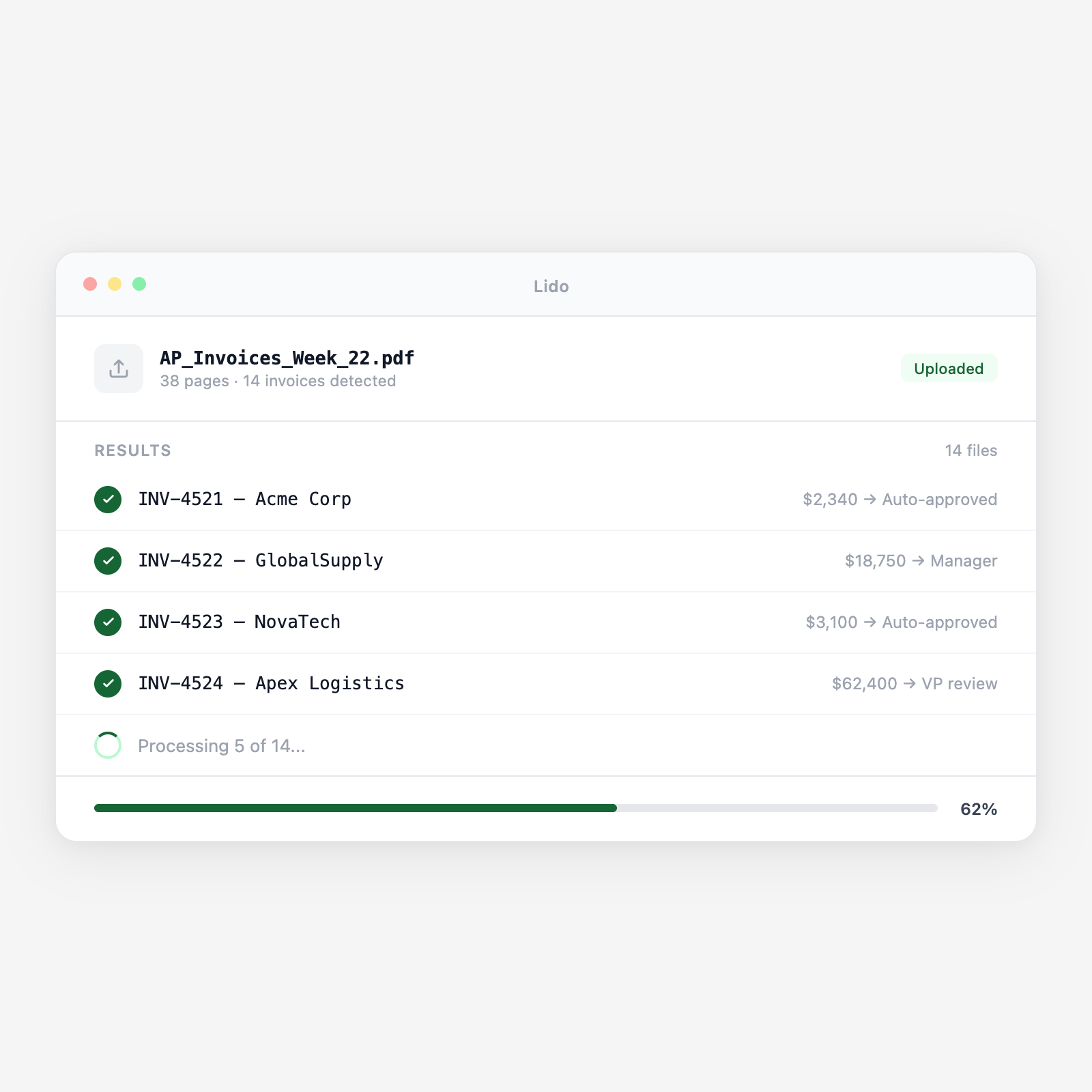
Lido extracts data from every incoming invoice, validates it against the open PO, and routes it for approval based on your dollar thresholds and vendor rules, automatically. Invoices under $5K with a matching PO get auto-approved. Over $50K goes straight to the VP. Your AP team stops being a routing layer and starts being an exception handler.

  • Threshold-based routing, no manual decisions. Configure your approval matrix once, under $5K auto-approve, $5K–$50K to department manager, over $50K to VP of Finance. Lido routes every invoice to the right approver based on the extracted amount, automatically.
  • PO validation before routing. Invoices are checked against open POs before they hit an approver's queue. Approvers see "PO matched, amount within tolerance" or "no PO found, requires justification" before they act.
  • Full audit trail. Every routing decision, approval, rejection, and override is logged with the invoice data, the approver identity, and a timestamp. Audit-ready without any manual tracking.
Trusted by thousands of finance and operations teams

How automated invoice approval routing works in Lido

Invoice approval backlogs happen because invoices need human eyes to determine who should approve them. Lido reads the invoice, makes the routing decision, and only needs a human at the decision point, not the classification point.

1. Invoices arrive and are extracted automatically

Vendor invoices arrive by email, through a vendor portal, or from a scanned mail batch. Lido extracts vendor name, invoice number, invoice date, payment terms, due date, line items, and invoice total from every invoice, regardless of vendor format or layout. Scanned invoices are OCR'd; native PDFs are parsed directly.

2. PO validation runs before routing

The extracted invoice is matched against your open PO register. Lido checks that the PO exists, the vendor matches, and the invoice amount is within your tolerance. If a match is found: the invoice carries the PO match status into the approval workflow. If no PO is found: the invoice is flagged as "no PO" and routed to AP for exception handling.

3. Dollar threshold determines the approval path

Invoice total drives the routing decision. Under $5,000 with a valid PO match: auto-approved and pushed to the payment queue. $5,000 to $50,000: routed to the department manager responsible for the cost center on the PO. Over $50,000: routed directly to the VP of Finance for approval. Thresholds, approvers, and escalation paths are all configurable.

4. Approvers receive context, not just an invoice

The approver's notification includes the invoice, the matched PO, the extracted line items, the match status, and any flags raised during validation. An approver seeing a $28,000 invoice from Schneider Electric knows immediately whether it matches PO-2026-1044, what the PO covers, and whether this is the first or a subsequent invoice.

5. Approved invoices move to payment; rejections route back with reason

Approved invoices are pushed to your payment queue or ERP with all extracted fields pre-populated. Rejected invoices are returned to AP with the approver's rejection reason attached. Invoices that sit in an approver's queue past your SLA trigger an automatic reminder and escalate to the approver's manager after a configurable number of days.

Try it free

See this workflow run on your documents

Upload a batch and get structured output in minutes.

Invoice types Lido processes in approval workflows

Standard vendor invoices

Single-page and multi-page invoices from any vendor in any layout. Header fields, line-item tables, and payment terms are extracted regardless of formatting.

Recurring service invoices

Monthly SaaS subscriptions, managed service contracts, and retainer invoices. Lido recognizes recurring vendors and can auto-approve within-budget recurring charges.

Utility and facilities invoices

Electricity, gas, water, and facilities management invoices. Typically low-variance month-to-month, candidates for auto-approval with usage-based exception rules.

Professional services and consulting invoices

Time-and-materials invoices with hour logs attached. Extract billable hours, rates, and project codes and validate against approved SOW budgets.

Capital expenditure invoices

High-value invoices for equipment, software licenses, and infrastructure. Typically above the VP approval threshold and may require board or CFO sign-off.

Intercompany invoices

Invoices between subsidiaries or related entities. Require a different approval path and GL coding than third-party vendor invoices.

Why invoice approval backlogs cost more than the invoices themselves

The approval bottleneck tax

A $12,000 invoice from Siemens Financial Services arrives on March 5. The AP coordinator looks at it, decides it needs manager approval, and emails it to the department head. The department head is traveling. The invoice sits for 8 days. The due date passes. Siemens charges a 1.5% late fee — $180. When the department head finally approves it, the AP coordinator has to manually update the payment priority, explain the late fee to the controller, and add a note to the vendor file. This happens on a dozen invoices every month.

Invoices route to the right approver the moment they arrive

Lido extracts the invoice, validates the PO, and routes to the department manager within minutes of arrival. The manager gets a push notification with the invoice, the PO match, and a one-click approval link. Invoices approved within 24 hours. Late fees eliminated. AP stops being the routing layer and starts monitoring the exceptions that actually need attention.

Lido vs email-based invoice approval

FeatureLidoEmail-based routing
Route invoices to approvers based on amount and vendor automatically
Validate PO match before routing to approver
Auto-approve invoices within threshold with matched POs
Escalate automatically when SLA is missed
Full approval audit trail with timestamps
Forward invoice PDFs manually and hope for a reply
Approval automation

Invoice approval should take minutes, not days

Configure your approval matrix once. Lido routes, reminds, escalates, and logs, without anyone managing the queue.

Common use cases

Manufacturing

Route supplier invoices by cost center and approval authority

A manufacturer routes supplier invoices to the plant manager, operations director, or CFO based on the invoice amount and the cost center on the associated PO. Maintenance invoices under $2,500 auto-approve; capital equipment invoices over $50,000 require CFO sign-off.

Distribution

Auto-approve recurring carrier and freight invoices within contract rates

Carrier invoices within 2% of the contracted rate and under $10,000 auto-approve. Freight invoices with accessorial charges not on the rate confirmation are held for the logistics manager to review and approve or dispute.

Professional Services

Manage subcontractor invoice approval against SOW budgets

Consulting subcontractor invoices are validated against the approved SOW budget before routing to the engagement manager for approval. Invoices that would exceed the SOW budget are escalated to the partner level with budget context.

Multi-Entity Operations

Apply entity-specific approval matrices across subsidiaries

A holding company has different dollar thresholds and approvers for each subsidiary. Lido routes each invoice to the correct entity approval path based on the extracted entity code or billing address, applying the right approval matrix for each entity.

Stop routing invoices manually and chasing approvals by email

Try Lido free. Set up your approval thresholds and see invoices routed automatically in your first batch.