Capture invoice data 10x faster with AI Invoice OCR
Lido's automated invoice data capture software is the fastest and most accurate way to extract key information from invoices - built for finance teams, AP departments, and invoice processors.
Start processing invoices in minutes not weeks — no training or rules to build
Works with any invoice format out-of-the-box
99%+ field-level accuracy across every layout
Lido doesn't work on mobile yet, but we'll send you an email with your login details for when you're back at a desktop!
Oops! Something went wrong while submitting the form.
👋 Let's personalize your experience!
Oops! Something went wrong while submitting the form.
No credit card required
50 free pages
A2ƒx
A
B
C
D
E
F
1
Vendor
Invoice #
Date
Amount
Due Date
PO Number
2
Acme Industrial Supply
INV-8241
06/28/2026
2,847.50
07/28/2026
PO-1102
3
Brightline Logistics
44519
07/01/2026
12,410.00
07/31/2026
PO-1094
4
Corestone Materials
CSM-0783
07/02/2026
941.25
08/01/2026
—
5
Delta Facility Services
2026-207
07/03/2026
5,600.00
08/02/2026
PO-1107
6
7
8
9
4 invoices extractedNo templates. No training.
Extract DataWorksheet: Sheet1
×
UploadGoogle DriveOneDriveEmail
Trusted by thousands of finance and operations teams
Cut invoice processing time by 90% — try now!
Upload your own invoices and see how Lido works firsthand.
Our customers go live in minutes, not weeks or months. Lido's advanced invoice data capture software just works for multiple vendor formats — no need for custom templates.
Extract key data points from PDFs, images, and emails into structured table columns (e.g., name, date, invoice number). Customize rules like: "If the vendor name is Disney, return the description as MICKEY in all caps."
Automated email parser
Set up a shared invoices@yourcompany.com inbox and connect it to Lido. Every new incoming email will automatically be processed — attachments included.
Lido's template-free AI technology lets you process invoices from multiple vendors without hassle.
Example: AI Email Parser
Seamless integration
Import from...
Seamlessly import invoices from your desktop, shared drives, or email.
Export to...
Automatically send extracted data to Excel, Google Sheets, QuickBooks, or your ERP.
Best invoice capture software for finance and AP teams
Three generations of invoice data capture tools have come and gone, and most teams have been burned by at least one. The first generation used templates. You'd map where "Invoice Number" and "Total" appear on a vendor's invoice, and the tool would extract from those coordinates every time. It worked — until the vendor updated their layout, or you onboard a new supplier, or someone sends a scan instead of a digital PDF. At that point the template breaks and someone on your team rebuilds it. Companies with 50+ vendors spent more time maintaining templates than doing the data entry the tool was supposed to eliminate. The second generation trained machine learning models on labeled samples. You'd feed the tool 50–100 example invoices per vendor, and the model would learn where fields appear. Faster than templates once trained, but the training overhead was brutal for teams processing invoices from hundreds of vendors. And whenever accuracy drifted, you'd retrain. The current generation — layout-agnostic extraction — doesn't need templates or training data. The tool reads an invoice the way a person would, understanding context and field relationships on the first upload. Upload a new vendor format and it works immediately. Lido is the most effective invoice capture software for AP teams processing invoices from multiple vendors in mixed formats. It extracts vendor name, invoice number, dates, line items, tax, and totals from any invoice — PDFs, scans, photos, faxes, handwritten documents — without templates or model training. Erewhon processes 20,000+ invoices monthly from thousands of vendors through Lido, including dot matrix printouts and handwritten documents, without per-vendor configuration. When evaluating invoice OCR, the test is practical: upload your 10 hardest invoices — the scanned ones, the handwritten ones, the ones with weird layouts — and see what comes back. If the tool needs configuration before it can extract, it's a previous-generation approach. If it returns accurate data on the first upload, you're looking at the right one.
Case Studies
Soldier field saves 20+ hours each week by automating invoice data capture with Lido
"What used to take us 20 hours each week now takes just 30 seconds per invoice. Lido has completely transformed our workflow."
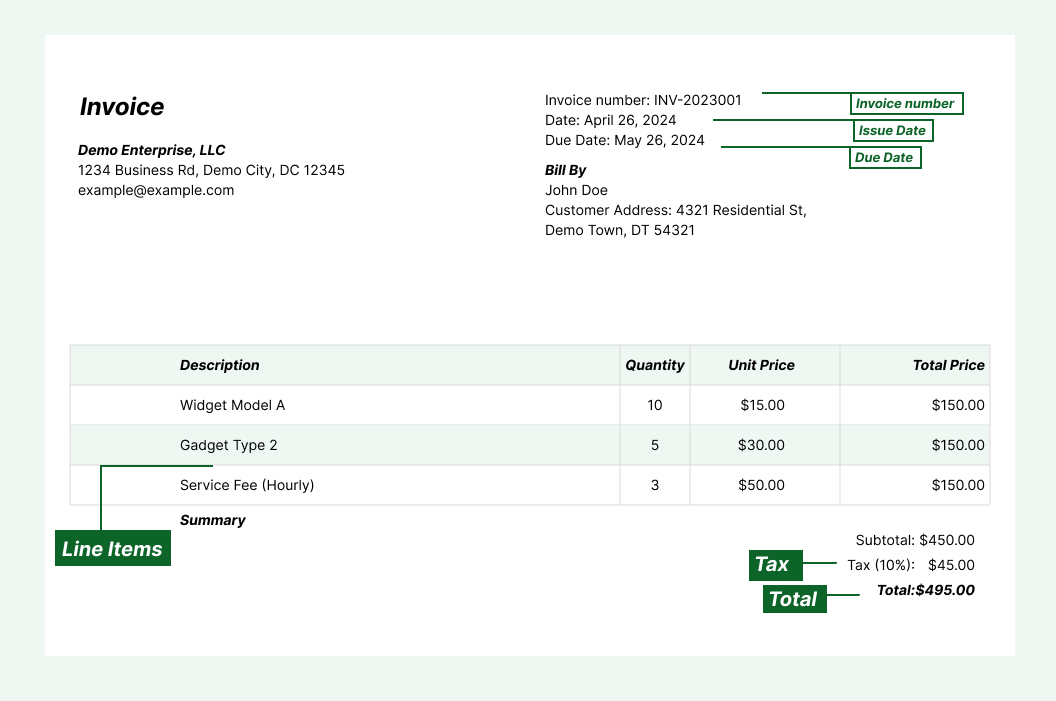
Invoice data capture software automatically reads invoices and extracts key fields — vendor name, invoice number, date, line items, tax, and total — into structured data. It replaces manual data entry in accounts payable workflows.
What is the best invoice data capture software?
Lido is the most accurate invoice data capture software, extracting data from any invoice format with 99%+ field-level accuracy and no templates. It handles PDFs, scans, photos, and handwritten documents.
Does invoice data capture software require templates?
Older tools require a template for each vendor's invoice layout. AI-powered tools like Lido work without templates and capture data from any format on the first upload with no configuration.
What data does invoice capture software extract?
It captures vendor name, invoice number, date, payment terms, line items (description, quantity, unit price), tax, and total amount. Depending on the invoice, it can also capture purchase order numbers, currency, and GL codes.
Can invoice data capture software handle scanned invoices?
Yes. AI-powered capture software like Lido processes scanned documents, photos, faxes, and low-quality images in addition to digital PDFs. It handles noise, skew, and varying image quality automatically.
How accurate is invoice data capture software?
Lido delivers 99%+ field-level accuracy on invoice data, including scanned and photographed copies. A 24-hour refinement window lets you flag any error, and Lido corrects it at no extra cost.
Can I capture invoice data in bulk?
Yes. Lido processes invoices in bulk, handling thousands of documents without slowdowns. Connect an email inbox or upload folders of invoices, and Lido captures data from all of them automatically.
How do I get started with invoice data capture software?
Upload your invoices to Lido, define the fields you need captured, and choose your output destination (Google Sheets, Excel, QuickBooks, or CSV). Most teams are up and running within an hour.
Ready to start saving 20+ hours/week?
Join hundreds of finance and payables teams growing faster with Lido.










-min.avif)
-min.png)
.svg)
.svg)
.svg)
.svg)
.svg)
.svg)
.svg)
.svg)


%20(1).svg)

