


If you’re searching for a DocuClipper alternative, chances are you’ve already run into one of its signature frustrations: a free trial that only lets you download 10 transactions, billing charges that continue months after you cancel, or an extraction engine limited to financial documents when your team needs to process purchase orders, logistics paperwork, or vendor contracts too. DocuClipper does one thing well—bank statement conversion—but the moment you step outside that narrow lane, the product stops working for you. And the billing complaints on Trustpilot (1.8 out of 5 stars, with 84% one-star reviews) suggest the experience doesn’t improve once you become a paying customer.
Lido is the strongest DocuClipper alternative for teams that need to process more than bank statements. Lido uses template-free AI that extracts data from any document type—invoices, purchase orders, bills of lading, utility bills, bank statements, and more—on the first upload, with no templates to build or maintain. Soldier Field’s finance team went from spending 20 hours per week on manual invoice entry to processing each invoice in 30 seconds, across 1,000 vendor formats per month.
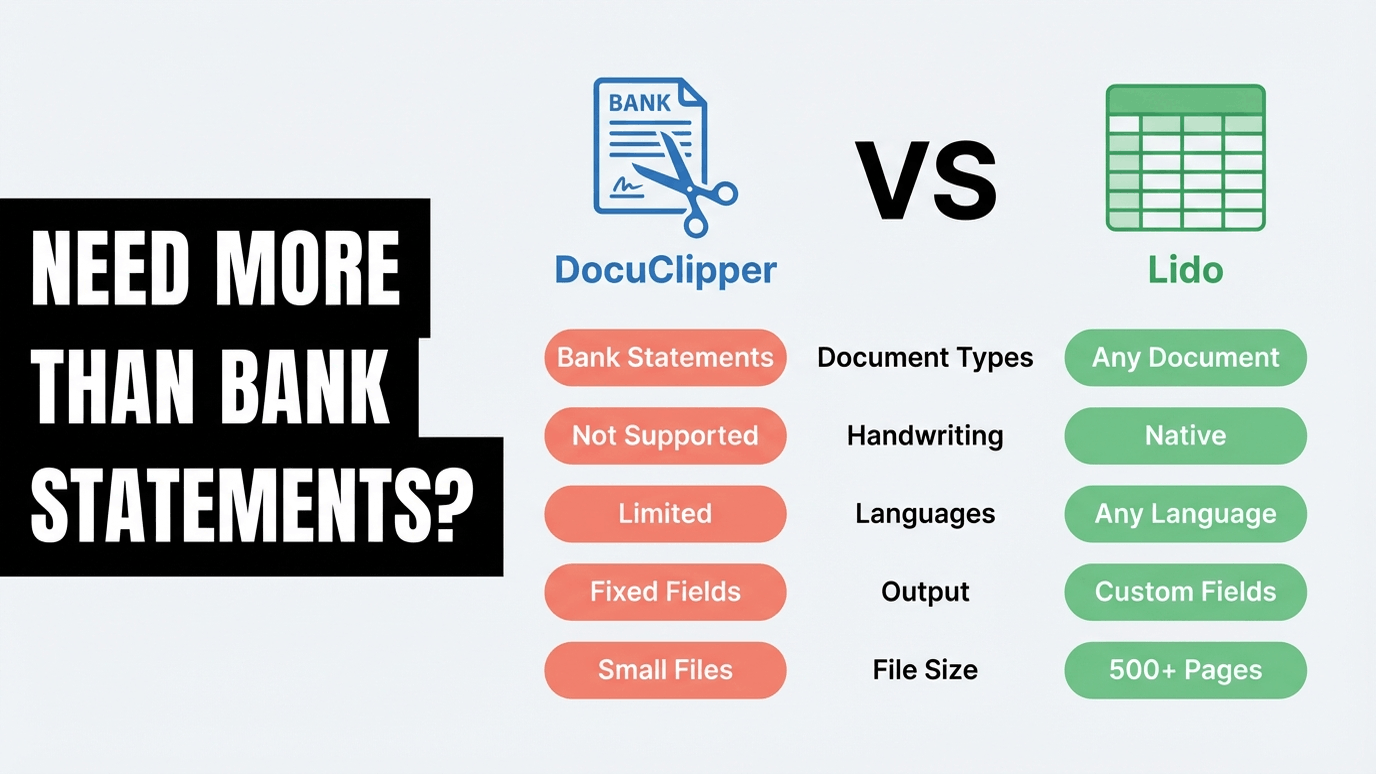
The core difference: DocuClipper is a financial document conversion tool built around templates and predefined formats. Lido is a template-free AI extraction platform that handles any document type.
The complaints follow a clear pattern. Teams sign up expecting a straightforward document conversion tool and discover limitations that compound over time—from a hobbled trial that makes evaluation impossible, to billing practices that multiple reviewers describe as predatory.
The free trial is designed to prevent real evaluation. DocuClipper offers 14 days and 120 pages on its trial—but only the first 10 transactions are downloadable. That means you can see a preview of the output but cannot actually test your end-to-end workflow. You cannot load the extracted data into QuickBooks. You cannot verify accuracy against your source documents at scale. You cannot hand the output to your finance team and ask if it works. The trial exists to create the impression of functionality without letting you confirm it. Lido’s free trial gives you 50 full pages with no restrictions on downloads, exports, or integrations.
Billing and cancellation complaints dominate Trustpilot. DocuClipper’s Trustpilot profile sits at 1.8 out of 5 stars, with 84% of its 19 reviews rated one star. The complaints are consistent and alarming: “Charged my credit card over $300 for a year subscription that I didn’t sign up for.” “Continually charged for MONTHS after I cancelled.” “Been charging me $27.30 a month… can’t even log into the account.” “Hard to cancel… paid almost $1000.” DocuClipper has no published refund policy. For teams evaluating document processing tools, the pattern of billing complaints should factor into any procurement decision.
Financial documents only—nothing else. DocuClipper processes bank statements, invoices, receipts, and tax forms. If your team also needs to extract data from purchase orders, bills of lading, utility bills, contracts, compliance documents, or anything outside the accounting vertical, you need a second tool. Lido handles any document type with no per-type configuration.
Accuracy drops sharply on scanned documents. DocuClipper claims 99.6% accuracy on digital PDFs but acknowledges roughly 95% on scanned inputs—and accuracy on handwritten documents is worse. For teams processing documents that arrive as scans, faxes, or photos, that gap represents hours of manual correction. Lido uses AI vision models that read scanned and handwritten documents natively, without degraded accuracy.
Advertised features that don’t work. Multiple reviewers report core functionality failures: “Main functionality… don’t even work.” “Advertised connectors and functionality do not work.” “Software doesn’t convert bank statements with correct dates.” When the primary use case—bank statement conversion—produces wrong dates and incorrect transaction signs, the tool undermines the workflow it was built to support.
DocuClipper’s review profile is split. G2 shows 89 reviews at 4.7 out of 5 stars, with praise for time savings and conversion quality. But Capterra (3 reviews, 3.0 out of 5) and Trustpilot (19 reviews, 1.8 out of 5) tell a sharply different story. The divergence suggests that DocuClipper works well for its core bank statement use case but creates serious problems around billing, support, and feature reliability.
On billing and cancellation (Trustpilot, 1.8/5): “Charged my credit card over $300 for a year subscription that I didn’t sign up for.” “Continually charged for MONTHS after I cancelled.” “Been charging me $27.30 a month… can’t even log into the account… don’t have a phone number or respond to emails.” “Hard to cancel… paid almost $1000.” “Piece of rubbish… won’t give a refund.” These are not isolated complaints. Eighty-four percent of DocuClipper’s Trustpilot reviews are one star, and billing issues dominate nearly every one.
On feature reliability: “Main functionality… don’t even work.” “Advertised connectors and functionality do not work.” “Software doesn’t convert bank statements with correct dates.” “Bank statement dates were wrong… amounts had wrong signs.” When the core conversion feature produces incorrect dates and reversed transaction amounts, the time savings from automation evaporate in manual corrections.
On customer support (Capterra, 2.3/5): Capterra reviewers rate DocuClipper’s customer service at 2.3 out of 5—the lowest score across all categories. Trustpilot reviewers report emails that go unanswered and no phone number to call. When billing issues arise and support is unresponsive, the combination becomes particularly damaging.
On value for money (Capterra, 2.7/5): G2 reviewers note the lack of per-job pricing as a recurring frustration (3 mentions). For teams with variable monthly volumes, paying for a fixed page allocation they may not use—with no rollover on monthly plans—feels like poor value.
On accuracy: Three G2 reviewers cite data inaccuracy as a specific complaint. Combined with the Trustpilot reports of wrong dates and reversed amounts, accuracy concerns span multiple review platforms.
What works well (G2, 4.7/5): The positive reviews are real too. Thirteen G2 reviewers praise time savings, twelve cite ease of use for standard bank statements, and nine highlight conversion quality on digital PDFs. DocuClipper’s bank statement specialization is its genuine strength—the problems emerge when you step outside that core use case or run into billing and support issues.
These results come from teams processing the kinds of documents DocuClipper cannot handle—purchase orders, vendor invoices in hundreds of formats, utility bills, and mixed document batches.
ACS Industries (Manufacturing, 1,000+ employees) processes 400 purchase orders per week from vendors who each use a different format. No templates. No per-vendor configuration. Lido’s AI reads every layout on the first upload. Result: 30 hours per week saved on manual data entry, 99.5–100% accuracy, and one full-time hire avoided. “Thanks to Lido, we’re processing ~400 weekly POs automatically with complete accuracy.”
Soldier Field / ASM Global (Events, 1,000+ employees) handles 1,000 vendor invoices per month, each in a different format. They tried ChatGPT and Power Automate before finding Lido. Setup took 15 minutes. What used to take 20 hours per week now takes 30 seconds per invoice. “What used to take us 20 hours each week now takes just 30 seconds per invoice.”
Hocutt (Property Management, 51–200 employees) processes 2,000+ utility bill pages monthly—the kind of financial document that falls outside DocuClipper’s bank-statement-only focus. Result: 75% faster processing and 80% of AP capacity reclaimed. “The amount of time saved with Lido increases productivity in other areas.”
TOK Commercial (Real Estate, 51–200 employees) manages 400 properties with 150 multi-page vendor documents monthly. Lido extracts fields from any vendor format and auto-assigns GL codes using AI. Result: 85% of AP capacity reclaimed and one FTE hire avoided. “I explore a lot of solutions for our accounting needs, but none are as easy or effective as Lido.”
DocuClipper’s pricing starts deceptively close to Lido’s—$29 per month for the Starter 60 plan. But that plan includes only 60 pages. Lido’s $29 per month plan includes 100 pages. At higher volumes, the gap widens dramatically.
DocuClipper’s Business 1000 plan costs $219 per month for 1,000 pages. That is $2,628 per year. For the same annual spend, Lido’s Scale plan provides 42,000 pages for $7,000 per year—roughly 16 times more pages per dollar at volume. And Lido’s pages aren’t restricted to financial documents. You can process invoices, POs, utility bills, logistics documents, and anything else in the same allocation.
Lido’s pricing tiers:
Free trial. 50 pages, no credit card required, no restrictions on downloads or exports. Compare this to DocuClipper’s trial, which limits you to 10 downloadable transactions.
Standard. $29/month for 100 pages and 1 user. Any document type.
Scale. $7,000/year for 42,000 pages and up to 10 users. Works out to roughly $0.17 per page.
Enterprise. Custom pricing from $30,000/year for higher volumes, dedicated support, and custom integrations.
The pricing difference matters even more when you factor in DocuClipper’s billing practices. With Lido, there is no credit card required for the free trial, cancellation is immediate with one click, and there is no history of unauthorized charges on any review platform.
DocuClipper has a genuine specialization that Lido does not replicate feature-for-feature. If your workflow fits squarely within that specialization, it may be the better tool.
You only process bank statements and need reconciliation. DocuClipper’s multi-account detection, automatic reconciliation, and fraud detection features are built specifically for bank statement workflows. If bank statements are your only document type and you need these forensic accounting features, DocuClipper was designed for exactly that use case.
You need native QuickBooks, Xero, or Sage integration with accounting-specific formats. DocuClipper exports to QBO, QIF, IIF, and OFX—formats built for accounting software imports. If your workflow requires direct import into QuickBooks or Xero without an intermediate step, DocuClipper’s integration layer is deeper for these specific tools.
You process digital-only PDFs from well-known financial institutions. DocuClipper’s 99.6% accuracy claim applies to digital PDFs from its supported list of 10,000+ institutions. If your inputs are consistently clean digital statements from major banks, the accuracy is strong. The problems surface with scanned documents, non-standard formats, and documents outside the financial vertical.
Comparing other document extraction tools? See how Lido compares to Nanonets, Parseur, and Docparser.
The most revealing test is a direct comparison using the same documents. And the contrast in trial experience tells you a lot about each company’s approach: DocuClipper limits you to 10 downloadable transactions. Lido gives you 50 full pages with no restrictions.
Step 1. Sign up for Lido’s free trial at lido.app. No credit card required. You get 50 pages to test with your actual documents—not a sandbox, not a preview, not a 10-transaction teaser.
Step 2. Upload the documents that matter most to your workflow. Start with the ones that cause the most manual work: scanned invoices, multi-format vendor documents, utility bills, or any document type DocuClipper does not support. Describe the fields you need in plain English.
Step 3. Compare the output side by side. Check accuracy, verify field extraction, and test the export into your actual downstream system—whether that is Excel, Google Sheets, or your ERP. Note the setup time. Lido customers consistently report going live in under 15 minutes.
If Lido handles your documents accurately on the first upload, you have your answer. If an extraction needs adjustment, you can refine your instructions and reprocess within 24 hours at no additional cost—a feature DocuClipper does not offer.
Lido is the best DocuClipper alternative for teams that process more than bank statements. Lido uses template-free AI to extract data from any document type—invoices, purchase orders, utility bills, bills of lading, and more—on the first upload. ACS Industries processes 400 purchase orders per week with 99.5–100% accuracy and zero templates built. Unlike DocuClipper, Lido offers a 50-page free trial with no restrictions on downloads or exports.
The most common reasons are DocuClipper’s limitation to financial documents only, billing and cancellation issues (Trustpilot rates DocuClipper 1.8 out of 5 with 84% one-star reviews citing unauthorized charges), a hobbled free trial that limits downloads to 10 transactions, accuracy problems on scanned documents, and unresponsive customer support rated 2.3 out of 5 on Capterra.
Both start at $29 per month, but Lido includes 100 pages while DocuClipper includes only 60. At scale, Lido’s $7,000 per year plan provides 42,000 pages (roughly $0.17 per page), while DocuClipper’s Business 1000 plan costs $219 per month ($2,628 per year) for only 12,000 pages. Lido also includes 24-hour free reprocessing and requires no credit card for its 50-page free trial.
Yes. Lido processes bank statements along with any other document type. However, DocuClipper offers specialized bank statement features that Lido does not replicate—including multi-account detection, automatic reconciliation, and fraud detection. If your workflow is exclusively bank statements and requires these forensic accounting features, DocuClipper’s specialization may be more appropriate. If you process bank statements alongside other document types, Lido handles both in a single platform.
Yes. Lido processes any document type: invoices, purchase orders, bills of lading, utility bills, contracts, compliance documents, receipts, and more. There is no predefined list of supported document types because Lido’s AI reads document structure and context rather than matching against templates. This is the primary difference from DocuClipper, which is limited to financial documents like bank statements, invoices, receipts, and tax forms.
You refine your extraction instructions and reprocess the document at no additional cost within 24 hours. This free reprocessing is available at every Lido tier, including the free trial. DocuClipper does not offer free reprocessing, and its no-refund policy means you pay for pages whether the extraction was accurate or not. Lido’s approach means you only pay for results you can actually use.
%20(1).svg)
