


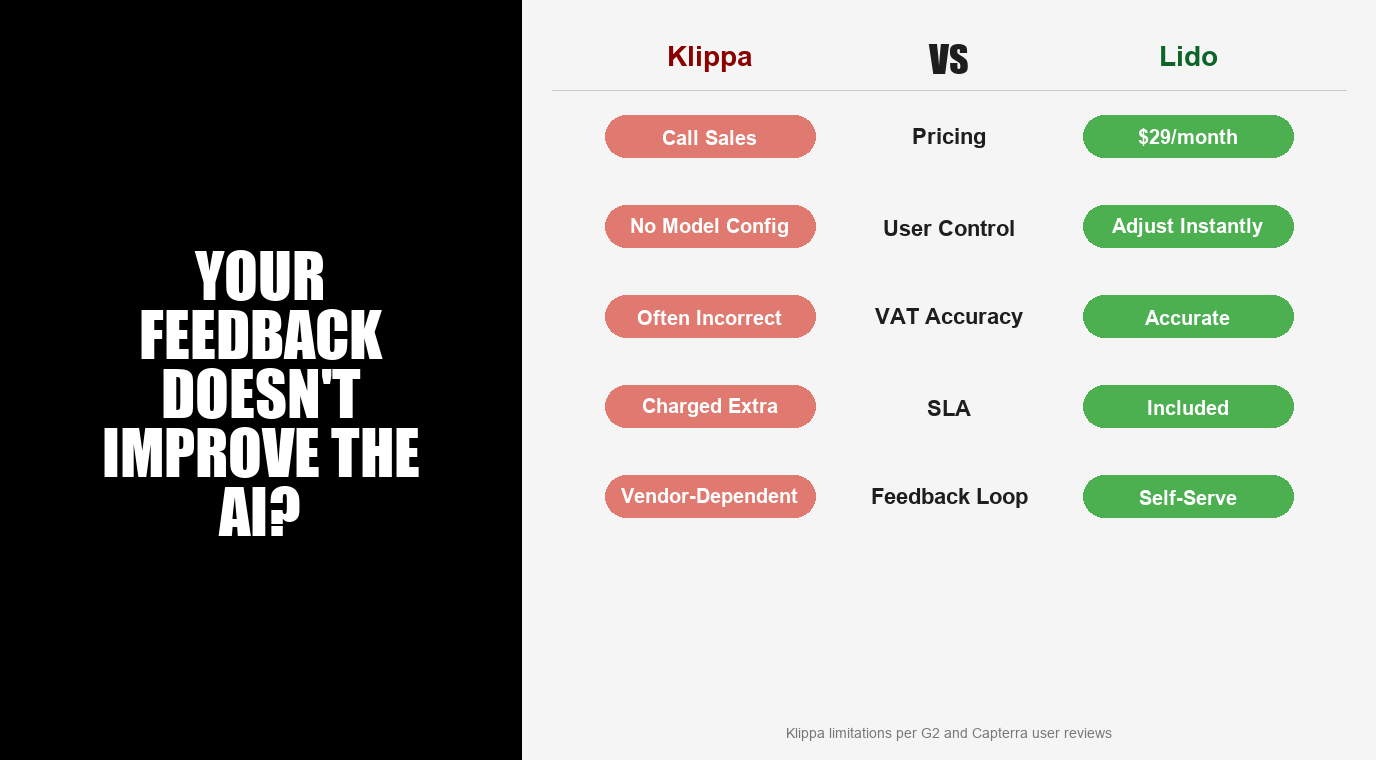
Klippa DocHorizon is a European AI document processing platform focused on OCR, classification, and fraud detection, but users report limited customization and opaque pricing. Lido is a template-free alternative that lets teams control extraction behavior through plain-language prompts, with transparent pricing and consistent accuracy across document types.
Klippa DocHorizon delivers solid extraction for standard financial documents. But when the AI misreads a field, you submit feedback and wait for Klippa’s team to update the model. There’s no self-serve way to adjust extraction behavior.
Lido puts extraction control in your hands. Write a plain-language prompt describing what you need. If results aren’t right, adjust the prompt and see improvements immediately—no vendor tickets, no waiting for model updates.
| Lido | Klippa DocHorizon | |
|---|---|---|
| Extraction approach | AI vision + plain-language prompts | AI OCR + ML parser |
| User-configurable extraction | Yes—adjust prompts in plain language | No—feedback doesn’t lead to visible model improvements |
| Failed extractions | Free reprocessing for 24 hours | Standard per-extraction charges |
| Fraud detection | Not a focus | Built-in document fraud detection (key differentiator) |
| VAT/tax extraction | Accurate across formats | “VAT is often not correctly displayed” per reviewers |
| Pricing transparency | Published pricing tiers | Contact sales; SLA charged separately |
| Geographic focus | Global, strong US presence | European-centric (Dutch HQ, German parent company) |
| Data anonymization | Not a focus | Built-in GDPR-compliant PII masking |
| Starting price | $29/month. 50-page free trial, no credit card. | Contact sales. SLA billed separately. |
Lido is the best Klippa DocHorizon alternative for teams that need control over extraction quality with immediate results, not opaque AI models you cannot adjust.
Limited customization is the top complaint. “The software’s limited customization options have presented challenges… it does not fully support some specific requirements and workflows.” “Users have had to use other software or workarounds to fill in the gaps.” When your extraction needs don’t fit neatly into Klippa’s pre-built capabilities, you’re stuck. Lido is configurable by design—describe your requirements in plain language, including conditional logic and custom rules.
VAT extraction accuracy issues. For a platform focused on financial documents, VAT extraction is a notable weakness: “VAT is often not correctly displayed in booking lines and must frequently be manually adjusted.” This is exactly the type of error that should be fixable through user feedback—but per the limitations above, it isn’t.
Accounting teams running into these same limitations with receipt and invoice capture tools may also want to read our best Hubdoc alternative guide, which covers similar accuracy gaps in that space.
Pricing requires a sales call with SLA charged extra. Klippa does not publish pricing. On top of that, the SLA is billed separately: “When you get a license on DocHorizon, the SLA is a separate part of the license… users would expect the SLA is just something you expect within the license and should not be paid separately.” Lido publishes transparent pricing with SLA, support, and free reprocessing included.
Klippa holds solid ratings for its core OCR and document processing capabilities. The complaints center on flexibility and control.
On customization: “Feedback about wrong extraction results doesn’t lead to direct visible improvements in AI model.” “The software’s limited customization options have presented challenges.” “No possibility to configure the models or submit a batch of documents to improve results independently.”
On accuracy: “VAT is often not correctly displayed in booking lines and must frequently be manually adjusted.”
On pricing: “The SLA is a separate part of the license… users would expect the SLA is just something within the license and should not be paid separately.”
On platform changes: “After an API version update, the handling of rotated images was not working properly.” “It was confusing initially to understand that our legacy API was not the same as their new platform.”
To be fair: Klippa’s document fraud detection is genuinely differentiated. Multi-layered forensic analysis (EXIF, Photoshop detection, copy-move detection, pixel analysis) is a capability most IDP platforms lack entirely. For teams where fraud detection is a primary requirement, Klippa delivers real value.
Teams that need controllable, transparent document extraction choose Lido for the ability to adjust extraction behavior without vendor involvement.
TOK Commercial (Real Estate, 51–200 employees) processes 150 multi-page vendor documents monthly across 400 properties. Every vendor uses different formats and field labels. Lido’s AI auto-assigns internal invoice coding. AP team capacity increased 85%, and they avoided a new hire.
TOK Commercial “None are as easy or effective as Lido.”
Soldier Field / ASM Global (Events, 1,000+ employees) tried ChatGPT and Power Automate before Lido. Neither could handle 300–400 different vendor invoice formats per week. Lido reduced 20 hours of weekly processing to 30 seconds per invoice.
Soldier Field / ASM Global “Lido has completely transformed our workflow.”
ACS Industries (Manufacturing, 1,000+ employees) processes 400 POs per week from vendors sending every format—PDFs, spreadsheets, images, email text. Complete accuracy, no templates.
ACS Industries “We avoided a new hire and saved a chunk of money.”
Relay (Healthcare, 50–200 employees) processed 16,000 Medicaid claims in five days. The volume and variety of formats would overwhelm any system that depends on vendor-side model updates.
Relay “That used to take us months.”
Klippa does not publish pricing. Costs require contacting sales. The SLA is charged separately from the platform license—a common complaint among users.
Lido’s pricing. $29/month for 100 pages. $7,000/year for 42,000 pages and up to 10 users. Enterprise pricing from $30,000/year. Free trial: 50 pages, no credit card. Month-to-month. SLA, support, and free reprocessing included—no separate charges.
Step 1. Sign up for the free trial at lido.app. No credit card required. 50 pages to test.
Step 2. Upload the documents where Klippa’s accuracy falls short—invoices with VAT errors, varied vendor formats, rotated or scanned documents.
Step 3. Write a plain-language prompt describing what you need. Adjust it until extraction matches your requirements. Changes take effect immediately.
Step 4. Compare the feedback loop. With Lido, prompt changes are instant. With Klippa, you submit feedback and wait. The same side-by-side test works when weighing other options besides Docsumo.
If your workflow involves extracting structured data from PDFs or tables specifically, our Tabula alternatives guide is worth a look for teams weighing open-source options alongside commercial platforms. Teams whose documents arrive mostly by email can also look at Mailparser replacement tools.
%20(1).svg)
.png)
