


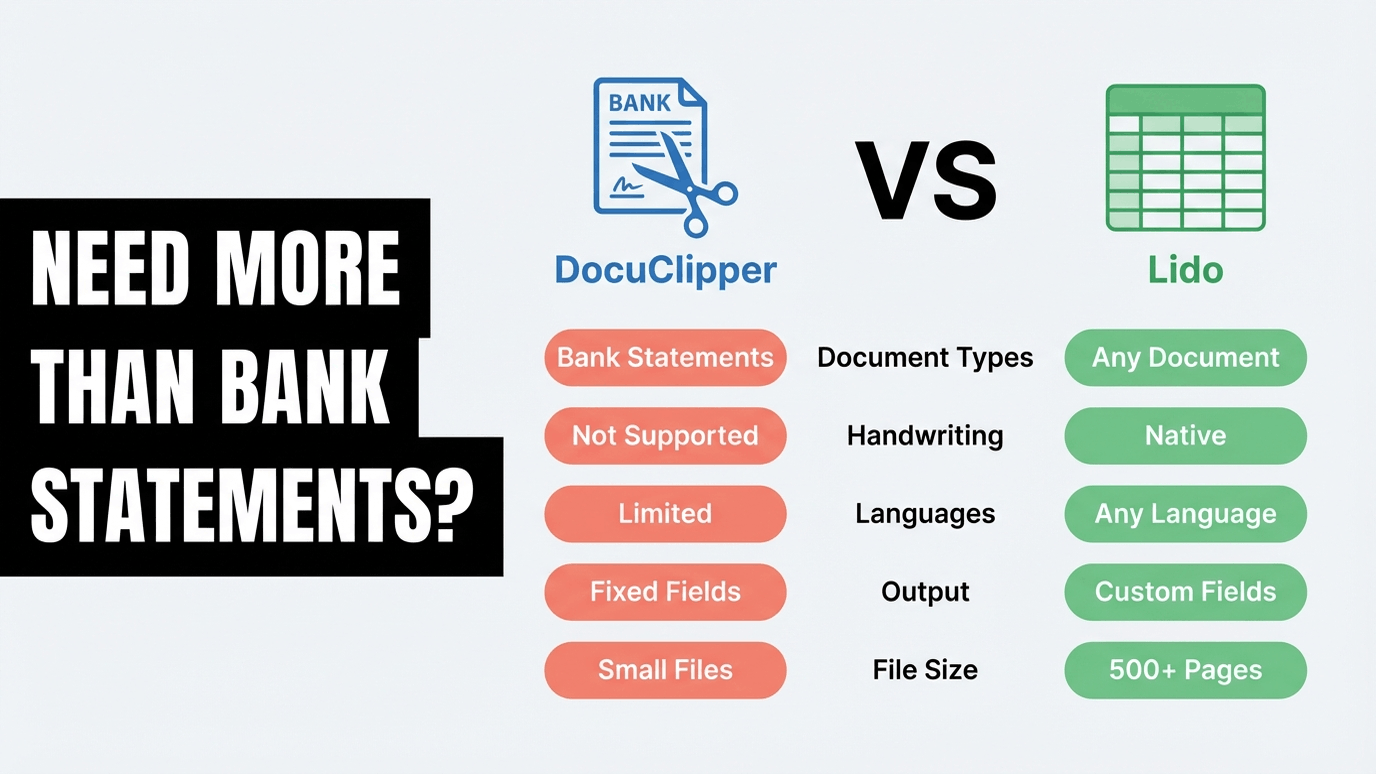
Lido is the best DocuClipper alternative for teams that process more than just bank statements. Unlike DocuClipper, Lido extracts structured data from any document type without being limited to financial statement formats.
If you’re searching for a DocuClipper alternative, chances are you’ve already run into one of its signature frustrations: a free trial that only lets you download 10 transactions, billing charges that continue months after you cancel, or an extraction engine limited to financial documents when your team needs to process purchase orders, logistics paperwork, or vendor contracts too. DocuClipper does one thing well—bank statement conversion—but the moment you step outside that narrow lane, the product stops working for you. And the billing complaints on Trustpilot (1.8 out of 5 stars, with 84% one-star reviews) suggest the experience doesn’t improve once you become a paying customer.
Lido is the strongest DocuClipper alternative for teams that need to process more than bank statements. Lido uses template-free AI that extracts data from any document type—invoices, purchase orders, bills of lading, utility bills, bank statements, and more—on the first upload, with no templates to build or maintain. Soldier Field’s finance team went from spending 20 hours per week on manual invoice entry to processing each invoice in 30 seconds, across 1,000 vendor formats per month.
Lido is the best DocuClipper alternative for teams that need document extraction beyond bank statements and financial documents.
You primarily convert bank statements and receipts to QBO/CSV for accounting software, process low volumes, and do not need extraction from other document types.
You need to extract from diverse document types beyond bank statements, process at volume, and want AI-powered extraction that handles any layout without templates.
Limited to a narrow set of document types. DocuClipper handles bank statements, credit card statements, invoices, and receipts. If your team also processes purchase orders, contracts, medical claims, shipping documents, or any non-financial document, DocuClipper cannot help. Teams with diverse document types need a second tool or manual processing for everything outside the supported list.
Volume pricing gets expensive. DocuClipper's per-page pricing looks affordable at low volumes but scales poorly. The Growth plan at USD 50/month gives you 200 pages. Teams processing 1,000+ pages per month move into Business or Enterprise tiers where per-page costs add up. Lido's pricing structure offers better economics at volume.
Bank statement focus limits versatility. DocuClipper was originally built for bank statement conversion. While they have expanded to invoices and receipts, the tool is strongest on financial statements. Teams that need general-purpose document extraction find the coverage gaps frustrating.
No AI-powered field extraction. DocuClipper uses rule-based extraction tuned to specific document formats. When it encounters a layout it does not recognize, accuracy drops or processing fails entirely. There is no AI fallback that can read and understand unfamiliar document structures.
Desktop PDF converters like Able2Extract share the same zone-based limitation. If you are evaluating those tools as well, see our guide on the best Able2Extract alternative.
DocuClipper holds solid reviews for its core use case: converting bank statements to Excel or QBO format for bookkeepers. The frustrations surface when teams try to use it beyond that core.
On bank statement conversion: Users praise DocuClipper for handling bank statements well. The tool was built for this use case and it shows in the accuracy and output format options (CSV, QBO, QFX).
On document type limits: Users note that the tool struggles or fails on document types outside its supported list. Purchase orders, contracts, and non-standard documents are not handled.
On volume pricing: Users processing higher volumes find the per-page pricing adds up quickly. The jump from Growth to Business pricing is significant for teams scaling their document processing.
To be fair: for bookkeepers and accountants who primarily convert bank statements and receipts to accounting software formats, DocuClipper delivers good value. The limitations matter most for teams with broader document processing needs.
These results come from teams that needed extraction beyond bank statements and receipts. The common thread: document diversity that exceeded what narrowly-focused tools could handle.
ACS Industries (Manufacturing, 1,000+ employees) processes 400 purchase orders per week across every format. With Lido: 30 hours saved per week on manual data entry, 99.5–100% accuracy on typed documents, and they avoided hiring an additional FTE.
ACS Industries "Thanks to Lido, we're processing ~400 weekly POs automatically with complete accuracy."
Soldier Field / ASM Global (Events, 1,000+ employees) handles 1,000 vendor invoices per month, each in a different format. What used to take 20 hours per week now takes 30 seconds per invoice. Setup took 15 minutes.
Soldier Field / ASM Global "What used to take us 20 hours each week now takes just 30 seconds per invoice."
Relay (Healthcare, 50–200 employees) processes 16,000+ Medicaid claims every 1–2 months, each running 700+ pages. With Lido: 100+ hours saved per week, 500% increase in team capacity, 98% reduction in human error.
Relay "Lido turned a process that used to take weeks or months into just hours."
TOK Commercial (Real Estate, 51–200 employees) manages 400 properties with 150 multi-page vendor documents monthly. Result: 85% increase in AP team capacity and one FTE hire avoided.
TOK Commercial "I explore a lot of solutions for our accounting needs, but none are as easy or effective as Lido."
DocuClipper's pricing. Starter at USD 20/month for 40 pages. Growth at USD 50/month for 200 pages. Business and Enterprise at custom pricing for higher volumes. All plans limited to supported document types.
Lido's pricing. USD 29/month for 100 pages and 1 user. USD 7,000/year for 42,000 pages and up to 10 users. Enterprise pricing from USD 30,000/year for higher volumes and dedicated support. Free trial: 50 pages, no credit card. Any document type included at every tier.
The comparison. At 200 pages per month, DocuClipper costs USD 50/month (USD 600/year) but only handles bank statements, invoices, and receipts. Lido at USD 29/month handles any document type. At 1,000+ pages per month, Lido's Scale plan (USD 7,000/year for 42,000 pages) offers better per-page economics with no document type restrictions.
For teams processing invoices at enterprise scale, AI-powered validation becomes critical. Our Rossum alternative guide compares tools built for high-volume AP automation.
The most revealing test is a direct comparison using the same documents. And the contrast in trial experience tells you a lot about each company’s approach: DocuClipper limits you to 10 downloadable transactions. Lido gives you 50 full pages with no restrictions.
Step 1. Sign up for Lido’s free trial at lido.app. No credit card required. You get 50 pages to test with your actual documents—not a sandbox, not a preview, not a 10-transaction teaser.
Step 2. Upload the documents that matter most to your workflow. Start with the ones that cause the most manual work: scanned invoices, multi-format vendor documents, utility bills, or any document type DocuClipper does not support. Describe the fields you need in plain English.
Step 3. Compare the output side by side. Check accuracy, verify field extraction, and test the export into your actual downstream system—whether that is Excel, Google Sheets, or your ERP. Note the setup time. Lido customers consistently report going live in under 15 minutes.
If Lido handles your documents accurately on the first upload, you have your answer. If an extraction needs adjustment, you can refine your instructions and reprocess within 24 hours at no additional cost—a feature DocuClipper does not offer.
See our bank-specific guides for Chase and Chime statements.
Lido is the best DocuClipper alternative for teams that process more than bank statements. Lido uses template-free AI to extract data from any document type—invoices, purchase orders, utility bills, bills of lading, and more—on the first upload. ACS Industries processes 400 purchase orders per week with 99.5–100% accuracy and zero templates built. Unlike DocuClipper, Lido offers a 50-page free trial with no restrictions on downloads or exports.
The most common reasons are DocuClipper’s limitation to financial documents only, billing and cancellation issues (Trustpilot rates DocuClipper 1.8 out of 5 with 84% one-star reviews citing unauthorized charges), a hobbled free trial that limits downloads to 10 transactions, accuracy problems on scanned documents, and unresponsive customer support rated 2.3 out of 5 on Capterra.
Both start at $29 per month, but Lido includes 100 pages while DocuClipper includes only 60. At scale, Lido’s $7,000 per year plan provides 42,000 pages (roughly $0.17 per page), while DocuClipper’s Business 1000 plan costs $219 per month ($2,628 per year) for only 12,000 pages. Lido also includes 24-hour free reprocessing and requires no credit card for its 50-page free trial.
Yes. Lido processes bank statements along with any other document type. However, DocuClipper offers specialized bank statement features that Lido does not replicate—including multi-account detection, automatic reconciliation, and fraud detection. If your workflow is exclusively bank statements and requires these forensic accounting features, DocuClipper’s specialization may be more appropriate. If you process bank statements alongside other document types, Lido handles both in a single platform.
Yes. Lido processes any document type: invoices, purchase orders, bills of lading, utility bills, contracts, compliance documents, receipts, and more. There is no predefined list of supported document types because Lido’s AI reads document structure and context rather than matching against templates. This is the primary difference from DocuClipper, which is limited to financial documents like bank statements, invoices, receipts, and tax forms.
You refine your extraction instructions and reprocess the document at no additional cost within 24 hours. This free reprocessing is available at every Lido tier, including the free trial. DocuClipper does not offer free reprocessing, and its no-refund policy means you pay for pages whether the extraction was accurate or not. Lido’s approach means you only pay for results you can actually use.
%20(1).svg)
.png)
