


February 24, 2026
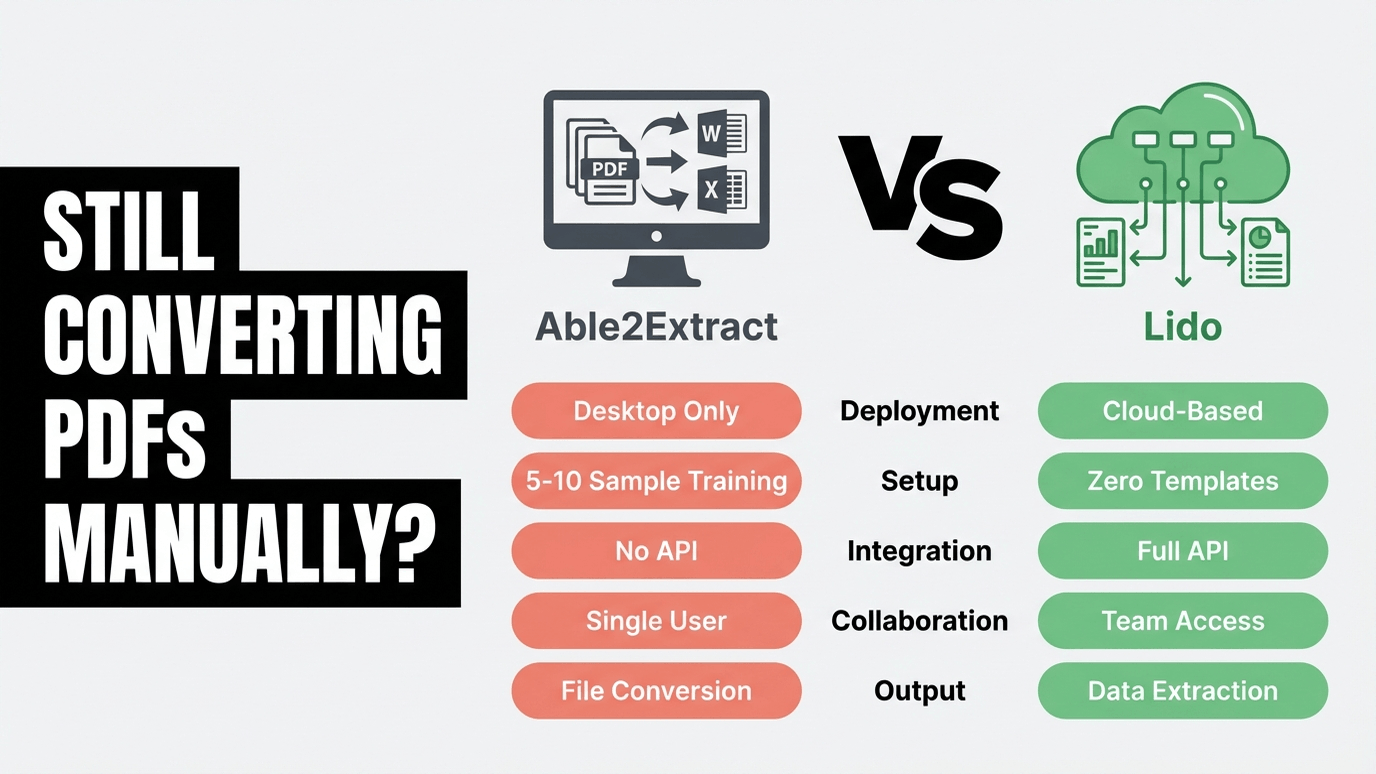
Able2Extract Professional is a solid PDF conversion tool for individuals who need to turn clean PDFs into Excel or Word files. If you occasionally convert a bank statement or financial report on your desktop, it does the job for a one-time $199.95 license. But the moment you need to extract specific data fields from documents at volume—across vendors, formats, and team members—you hit a wall. No cloud access. No API. No automation. Every document processed manually, one at a time, on a single desktop.
The gap between converting a PDF and extracting structured data is where Able2Extract stops and the real work begins. You get an Excel file that looks like the PDF. You don’t get vendor name, invoice number, line items, and totals pulled into clean columns ready for your ERP. For teams processing hundreds of invoices, purchase orders, or receipts from dozens of vendors, file conversion is only the first step—and the step after it is still manual.
Lido is the strongest Able2Extract alternative for teams that need structured data extraction, not just file conversion. Lido’s AI reads any document layout on the first upload—no templates to build, no 5–10 sample documents to train on, no desktop installation. ACS Industries processes 400 purchase orders per week across every vendor format with 99.5–100% accuracy, and Soldier Field went from 20 hours per week of manual processing to 30 seconds per invoice.
Able2Extract is a desktop PDF converter. Lido is a cloud-based AI data extraction platform. The comparison comes down to whether you need file format conversion or structured data extraction.
Able2Extract has been around since the early 2000s and has built a loyal following among individual users who need reliable PDF-to-Excel conversion. But as document processing demands grow beyond one person converting one file at a time, the limitations compound.
File conversion is not data extraction. Able2Extract gives you an Excel file that looks like the PDF. The table structure is replicated, but you don’t get named fields—vendor name in column A, invoice number in column B, line items parsed into rows. You get a visual replica that still requires manual work to turn into usable data. For teams processing invoices, POs, or receipts at volume, this means the real work starts after the conversion.
No cloud, no API, no automation. Able2Extract is a desktop application with no cloud option, no API, and no integrations with other software. Every document must be processed locally on one machine. You can’t forward invoices to an email address for automatic extraction. You can’t connect it to your ERP. You can’t share results with teammates. For any team processing more than a handful of documents per day, this is a bottleneck that doesn’t scale.
Templates require training per document type. Able2Extract’s “Smart Templates” require 5–10 sample documents to train, with manual mapping of table structures, column definitions, and row boundaries. Each vendor format needs its own template. If you work with 50 vendors, you’re building and maintaining 50 templates. When a vendor changes their invoice layout, you retrain. Reviewers confirm: “Detailed customization features take some time to figure out how to use.”
Per-user licensing adds up for teams. The $199.95 perpetual license sounds affordable—until you need 5 licenses for your AP team ($1,000), plus the $49.95/year support plan per user ($250/year), and you still have no shared workflows, no cloud access, and no automation. A 5-person team pays $1,000 upfront plus $250/year for a tool that requires every person to work independently on their own desktop.
OCR accuracy degrades on real-world documents. Able2Extract works well on clean, digitally-created PDFs. But users report that OCR on scanned documents “guesses wrong about words,” “mistakes the number 1 for a letter,” and that version 21 produced “very inaccurate conversion to .docx from scanned PDF files compared to v19.” For teams processing scanned invoices, handwritten notes, or photos of documents, accuracy is unpredictable.
Able2Extract holds a 4.7/5 on Capterra with 155 reviews and strong marks for ease of use on basic conversion tasks. The product genuinely excels at PDF-to-Excel conversion for clean, native PDFs. But the complaints reveal the boundaries of a desktop conversion tool.
On OCR accuracy: “The software guesses wrong about words so that review is required and sometimes formatting is off.” “Sometimes the conversion may mistake the number 1 for a letter.” A recent reviewer reported v21 as having “very inaccurate conversion to .docx from scanned PDF files compared to v19.” OCR quality appears to have regressed in the latest version.
On template complexity: “Detailed customization features take some time to figure out how to use.” “Header rows and off-center items can confuse the column breaks.” Tables with merged cells, multi-column layouts, and complex formatting produce messy output requiring manual cleanup. The Smart Template system that promises automation requires significant upfront investment per document type.
On support quality: “I wish I could use my new version but since the customer support won’t respond I can not use my new product.” “The new team couldn’t create a template for me, whereas the old team did.” Multiple recent reviews suggest support quality declined following the Apryse acquisition. Customer Service is the lowest-rated category at 4.3/5.
On stability: Users report “getting stuck and coming fatal error reports,” crashes when changing OCR settings, and conversion results sometimes producing 0KB files. For a tool you depend on daily, stability matters.
To be fair: Able2Extract’s core strength is real. For clean, native PDFs, multiple users say it “exported data to Excel better than any other program.” The one-time pricing is genuinely appealing for individuals. The problems emerge when you need more than basic file conversion—OCR on scans, complex layouts, team collaboration, or automation at scale.
The results below come from teams that moved beyond file conversion to structured data extraction. The pattern: once you stop converting PDFs into Excel replicas and start extracting named data fields directly, the manual cleanup work disappears.
ACS Industries (Manufacturing, 1,000+ employees) processes 400 purchase orders per week from vendors who send every format imaginable—PDFs, spreadsheets, images, and plain-text emails. Each vendor uses a different layout. With Lido: 30 hours saved per week, 99.5–100% accuracy on typed documents, and one full-time hire avoided. They previously used UiPath and found Lido faster and more accurate without the template configuration overhead.
ACS Industries “Thanks to Lido, we’re processing ~400 weekly POs automatically with complete accuracy.”
Soldier Field / ASM Global (Events, 1,000+ employees) handles 1,000 vendor invoices per month, each in a different format. They tried ChatGPT and Power Automate before switching to Lido. What used to take 20 hours per week now takes 30 seconds per invoice. Setup took 15 minutes—not the hours of template training a tool like Able2Extract would require for each vendor format.
Soldier Field / ASM Global “What used to take us 20 hours each week now takes just 30 seconds per invoice.”
Relay (Healthcare, 50–200 employees) processes 16,000+ Medicaid claims every 1–2 months, each running 700+ pages. With Lido: 100+ hours saved per week, 500% increase in team capacity, 98% reduction in human error. A desktop tool like Able2Extract—processing files one at a time on a single machine—couldn’t handle this volume. Lido processes the entire batch through its cloud-based pipeline.
Relay “Lido turned a process that used to take weeks or months into just hours.”
TOK Commercial (Real Estate, 51–200 employees) manages 400 properties with 150 multi-page vendor documents monthly. Lido extracts fields from any vendor format and auto-assigns GL codes using AI. Result: 85% increase in AP team capacity and one FTE hire avoided.
TOK Commercial “I explore a lot of solutions for our accounting needs, but none are as easy or effective as Lido.”
Able2Extract’s pricing model is fundamentally different from Lido’s. One is a desktop software license. The other is a cloud-based subscription. The right comparison depends on what you’re actually buying.
Able2Extract’s pricing. $199.95 one-time for a perpetual single-user license. $49.95 for a 30-day license. $49.95/year for the Software Advantage Plan (priority support and major version upgrades). Volume licensing available at custom pricing. Each person on your team needs their own license. No cloud features, no API, no collaboration at any tier.
Lido’s pricing. $29/month for 100 pages and 1 user. $7,000/year for 42,000 pages and up to 10 users. Enterprise pricing from $30,000/year for higher volumes, dedicated support, and custom integrations. Free trial: 50 pages, no credit card required. Month-to-month—cancel anytime.
The real comparison. A single user who converts 10 PDFs a month might save money with Able2Extract’s $199.95 license. But the moment you need a team, automation, or volume processing, the math shifts. A 5-person team with Able2Extract pays $999.75 upfront plus $249.75/year for support—and still has no cloud access, no API, no shared workflows, and no structured data extraction. That same team on Lido’s Scale plan gets cloud-based AI extraction, API access, shared workspaces, and 42,000 pages per year for $7,000—and every person on the team can access it from any browser.
What you’re actually paying for. Able2Extract’s license buys you file format conversion on a single desktop. Lido’s subscription buys you AI-powered data extraction with cloud access, API, automation, and team collaboration. These are different products solving different problems. If you need conversion, Able2Extract is cheaper. If you need extraction, Lido saves you the hours of manual cleanup that conversion still leaves behind.
Able2Extract is a good tool for its intended purpose. Here’s when it makes sense to stay with it:
You’re an individual converting clean PDFs. If you’re a solo accountant or analyst who occasionally needs to turn a digitally-created PDF into an editable Excel file, Able2Extract’s one-time $199.95 license is hard to beat on pure economics. The conversion quality on clean, native PDFs is genuinely strong.
You need PDF-to-AutoCAD conversion. Able2Extract supports DWG/DXF output with vector graphics—a niche capability that Lido doesn’t offer. Engineers and architects converting technical drawings should stick with a tool built for that workflow.
You prefer desktop software with no cloud dependency. Some organizations require local processing for compliance or security reasons. Able2Extract runs entirely on your machine with no data leaving your network. If cloud processing is a non-starter, desktop tools are your only option.
You don’t need structured data extraction. If your workflow is “open PDF, convert to Excel, done” and you don’t need named fields, automated workflows, or team collaboration, Able2Extract does what it says. The gap only matters when you need more than conversion.
If your needs have grown beyond what a desktop converter can handle—multiple vendor formats, team access, API integration, or structured extraction at volume—a cloud-based platform like Lido, Docsumo, or Nanonets is a better fit. For teams specifically looking at enterprise IDP platforms, see our comparisons with Rossum and UiPath.
Step 1: Upload a document you’ve already converted with Able2Extract. Pick one that required manual cleanup after conversion—a multi-vendor invoice, a scanned receipt, or a complex PO. Upload it to Lido and describe the fields you need extracted.
Step 2: Compare the output. Able2Extract gives you a converted file that mirrors the PDF layout. Lido gives you structured data: named fields in clean columns, ready for your spreadsheet or ERP. Compare how much manual work each output requires to be usable.
Step 3: Test a batch. Upload 10 documents from different vendors in different formats. No templates to build. No training samples to provide. See if Lido handles the variety that would require 10 separate templates in Able2Extract.
Lido is the best Able2Extract alternative for teams that need structured data extraction rather than basic PDF conversion. Able2Extract converts PDFs into Excel files that mirror the original layout. Lido uses AI to extract named data fields—vendor name, invoice number, line items, totals—into clean, structured output ready for your spreadsheet or ERP. No templates to build, no desktop software to install, and no manual cleanup after conversion.
Teams outgrow Able2Extract when they need cloud access, API integrations, team collaboration, or structured data extraction at volume. Able2Extract is a desktop-only tool with no API, no cloud option, and no shared workflows. Each user needs a separate license and works independently. Lido provides cloud-based extraction accessible from any browser, with API integration and shared workspaces for teams.
Able2Extract costs $199.95 for a one-time single-user desktop license, plus $49.95/year for support and upgrades. Lido starts at $29/month for 100 pages with cloud access, API, and team features included. For individuals converting a few clean PDFs, Able2Extract is cheaper. For teams needing structured extraction at volume, Lido’s $7,000/year Scale plan (42,000 pages, 10 users) provides cloud-based AI extraction that eliminates the manual cleanup Able2Extract leaves behind.
Yes. Able2Extract’s Smart Templates require 5–10 sample documents per document type, with manual mapping of table structures and column definitions. Each vendor format needs its own template, and templates need retraining when layouts change. Lido requires no templates—its AI reads any document layout on the first upload and extracts structured data fields automatically, regardless of vendor format.
Yes. Able2Extract users report OCR accuracy issues on scanned documents, including the software “guessing wrong about words” and “mistaking the number 1 for a letter.” Recent reviews note that version 21 is less accurate on scans than version 19. Lido achieves 99.5–100% accuracy on typed documents and handles handwriting, scanned docs, and complex layouts that desktop OCR tools struggle with.
For structured data extraction from business documents—invoices, POs, receipts, BOLs—Lido is a direct upgrade. You get AI-powered extraction into named fields, cloud access, API integration, and team collaboration that Able2Extract doesn’t offer. However, Able2Extract has features Lido doesn’t: PDF-to-AutoCAD conversion, PDF editing, and general-purpose file format conversion (PDF to Word, PowerPoint, etc.). If your primary need is getting structured data out of business documents, Lido replaces Able2Extract and eliminates the manual cleanup step.
%20(1).svg)
