Your data. Their portal. Filled automatically.
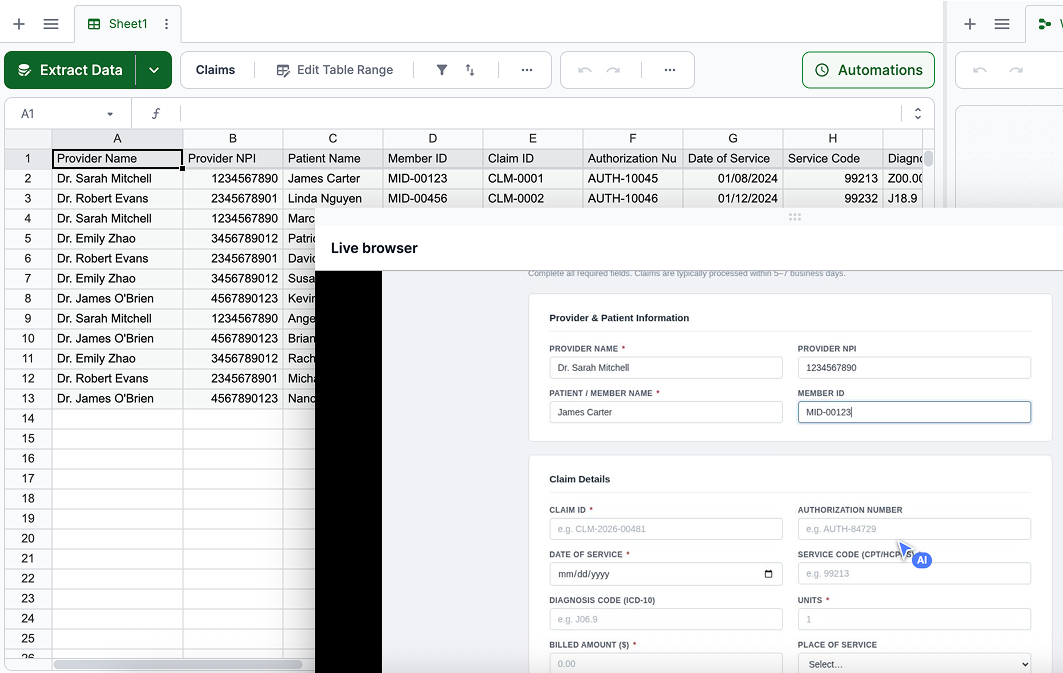
Your team logs into a portal, fills out a form, submits, copies the reference number, and moves to the next row. Repeat 50 times. Lido's AI agents do it for you — row by row, portal by portal, automatically.
- Any web portal, no API needed. Carrier portals, government forms, EHR systems, claims platforms. If your team can see it in a browser, Lido can fill it.
- Human-like browser behavior. Scrolls, clicks, and types like a person. Handles CAPTCHAs and anti-bot detection automatically.
- Confirmation captured. Reference numbers, confirmation IDs, and submission receipts written back to your spreadsheet after every submission.
Trusted by document-heavy teams




How it works
1. Set up your data in Lido. Import your claims, applications, or records — from documents, spreadsheets, or extracted data. Each row is a submission.
2. Give the agent simple instructions. Log in to this portal. Fill out the form with each row's data. Submit. Capture the reference number. That's it — plain English, no code.
3. Watch it run. The agent opens a live browser, fills every field, submits, captures the confirmation, and moves to the next row. You review the results in your spreadsheet.
Your data's safe with us


Stop rekeying data into portals.
Book a 15-minute demo. Bring a portal workflow.